This guide will show you how to define the scope of the analysis.
At the time of running a Kiuwan analysis, you can specify the scope of the analysis.
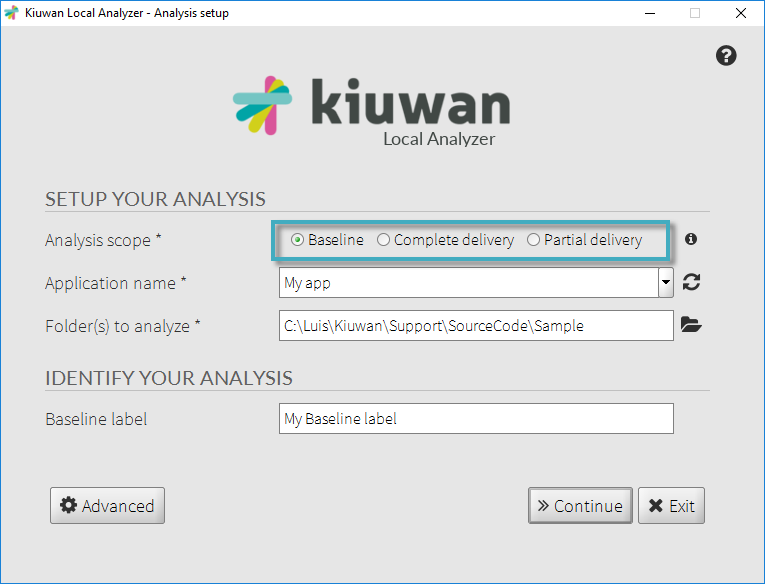
Before running a new analysis with KLA, you must select a scope depending on the type of analysis you want to run:
- Baseline: development milestones are usually analyzed as baselines
- Complete delivery: an important delivery of the whole application
- Partial delivery: a delivery usually associated with a change request
Baseline Analysis
Select Baseline to run the analysis as a baseline analysis of the selected application. The analysis will be run by default with the Model associated with the application, or click Advanced to specify a different model.
After running the Baseline analysis, click View Page to go to the Summary panel of the selected application Dashboard.
Delivery Analysis
For Delivery Analysis, specify further details in Kiuwan.
The Delivery can be specified as Complete, complete application analysis, or Partial, analysis of a portion of the application.
Specify the Change Request (CR) name (or ID) to link this analysis to a specific change request as considered in your ALM process. Also, specify the Change Request Status to link analysis to different phases of your development process.
When analyzing a delivery, indicate the CR status:
- In progress: Use this option when CR is under development but you want to inspect Kiuwan results, and know the Audit status but not include delivery results in overall statistics (please note that only "Resolved" deliveries will be included in Governance statistics). Typical uses might be analyses launched every day in Continuous Integration or for discrete analyses after concrete code changes.
- Resolved: This is the default value, use this option when the delivery to analyze is stable enough to be promoted to a testing/production environment.
Finally, you can associate a label with this Delivery analysis in the Delivery Label field.
KLA in CLI mode also allows specifying delivery analysis options.
Deliveries and Model Management
By default, when running a 'delivery' analysis, Kiuwan retrieves the model and version used in the baseline to run the analysis with the same model.
To tune your model, or to run the analysis with a more recent model version, overwrite this behavior in the application settings window, enabling the Force model in the deliveries checkbox.